Online RSVP
Online wedding RSVP — guests confirm by private link
Guests confirm attendance themselves through a private link — the couple stops chasing answers by phone, and all details arrive in the panel automatically. RSVP is free in the Start plan.
Start planPLN 0
Compare plans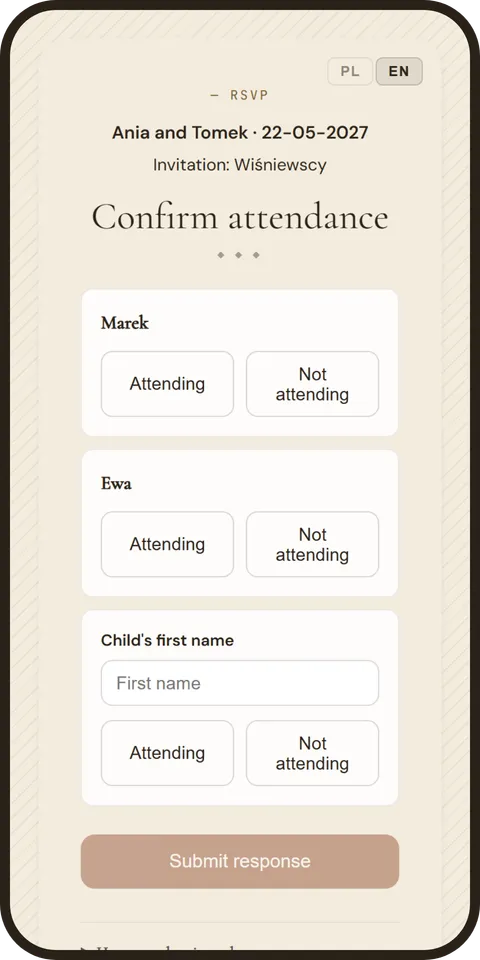
How it works
Add guests and families
You build the guest list and group guests into families with a main guest.
Send the private link
You copy the family link and send it by email or in any messaging app.
Answers arrive in your panel
You see confirmations, diets and plus-ones in the summary straight away.
How do you collect RSVPs without phoning every guest?
Each family gets its own private link to the RSVP form. You send it the way you like: by email, in a messaging app or as a text from your phone. The guest opens the link, sees the details the couple entered earlier and only marks the answers. You do not have to phone every aunt or keep a spreadsheet of replies.
What does a guest fill in on the RSVP form?
The main guest confirms attendance for the whole family at once. For each person they give:
- whether they will come,
- their diet,
- plus-one details, if the couple planned a place for a plus-one,
- children details, if the couple added places for children.
How do the RSVP deadline and the summary work?
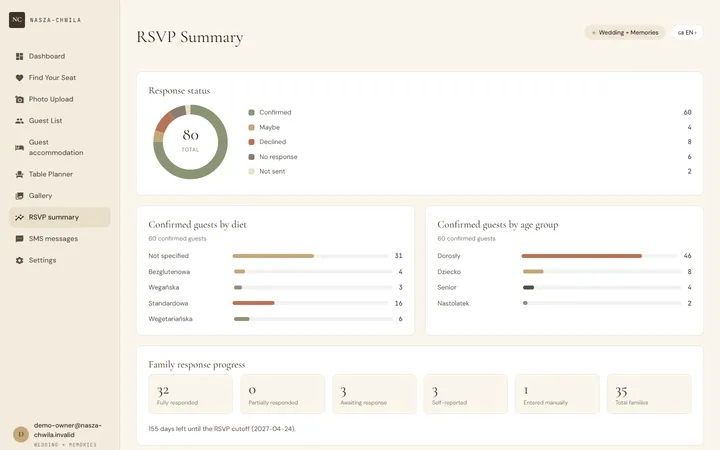
You set a date until which guests can reply and change their answers. After that date the form closes and the guest sees your contact details. In your panel you have a summary: how many guests confirmed, how many declined, who has not replied yet and how the diets add up.
How does RSVP connect to the guest list and the seating plan?
The RSVP form uses the same guest list you keep in your panel. A guest's answer changes their status on the list at once, and diets go into the counters. When you know who is coming, you open the seating planner and seat guests at the tables. The guest list, RSVP and the seating planner are free in the Start plan.
What the couple gets
A private link for every family
Each family gets a unique RSVP link. You copy it with one click and send it by SMS, email or a messaging app.
One reply for the whole family
The main guest confirms attendance for every family member and gives diets and details for a plus-one and children.
No sign-in and no account
The guest opens the link, sees their details already filled in and only confirms or corrects them.
RSVP deadline
The couple sets a cut-off date; after it the form closes and the guest sees the couple's contact details.
The couple controls the number of places
The couple creates the places for plus-ones and children, so the number of guests never goes above the plan.
RSVP summary
Confirmed, declined and pending guests, and the diet breakdown, in one view.
Frequently asked questions
Does a guest need an account to confirm attendance?
No. The guest opens the private link in the browser and sees their family form at once. There is no sign-in and no password.
How do I send guests the RSVP link?
In your panel you copy the family link with one click. You send it by email, in a messaging app or as a normal text from your phone.
Can a guest change their answer?
Yes, until the RSVP deadline the couple set. Changed answers show up in the summary at once. After the deadline the form is closed and the guest sees your contact details.
Can a guest add a plus-one?
Only into a place the couple prepared. In your panel you add a place for a plus-one or a child, and the guest types in the details. This way the number of guests matches your plan.