Guest list
Wedding guest list online — import from Excel
A complete wedding guest database: one-click import, families, filters, diets and table assignment — all in one tidy place. The guest list is free in the Start plan, with no guest limit.
Start planPLN 0
Compare plans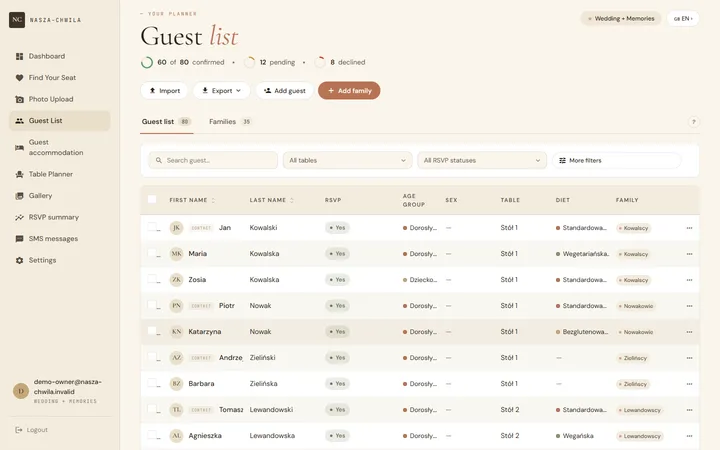
How it works
Import your list
You upload an Excel or CSV file or add guests by hand.
Group guests into families
You group guests into families with a main guest and a shared contact.
Filter and seat
You filter by diet or RSVP status and assign guests to tables.
How do you keep a wedding guest list online?
The guest list in your panel replaces the spreadsheet that goes back and forth between the couple and their parents. Every guest has a family, a diet, an age group and an RSVP status. Each family has a main guest, so you can see at once who answers for the whole group. The list has no guest limit and is free in the Start plan.
How do you import a guest list from Excel?
Prepare an Excel (.xlsx) or CSV file with your guests and upload it in the panel. After the import all guests are on the list, with no retyping. The easiest way is to start from our template and paste your list into it.
Download the example import file (.xlsx)How do you count diets, children and plus-ones?
Filters show guests by diet, age group, RSVP status, table or family. Live counters tell you how many guests have confirmed and how many have not replied yet. You know at once how many vegetarian meals to order and how many places to prepare for children.
How do you prepare the guest list for the venue and the caterer?
When the list is ready, you export it to Excel or CSV. The file holds names, age group, table, RSVP status, diet, contact and notes, so the venue and the caterer get everything in one place. After the last replies come in, just download the file again.
What the couple gets
Guest list import from Excel and CSV
Move your existing list from a spreadsheet in seconds, with no manual retyping.
Export to Excel and CSV
A ready list to print, for the caterer or the wedding venue.
Families
Guests belong to families with a main guest and a shared contact, which makes invitations and seating easier.
Advanced filters and search
By RSVP status, diet, table, age group, gender or family. Find any guest quickly.
Table assignment
The guest list connects to the seating plan, so you never do the work twice.
Live counters
You see at once how many guests have confirmed and how many have not replied yet.
Frequently asked questions
Is there a limit on the number of guests?
No. In every plan, including the free Start plan, you can add any number of guests.
Which guest list file can I import?
An Excel (.xlsx) or CSV file. The easiest way is to download the example file, paste your list into it and upload it in the panel.
Can I export the guest list?
Yes, to Excel or CSV, at any time. The venue and the caterer will find this file useful.
How does the guest list connect to RSVP and the seating plan?
It is the same list. Families get their RSVP links from it, the answers come back to the list, and in the seating planner you drag guests onto tables.